
How many cores should I use? Job Scaling
Introduction
There is no single answer we can give here – there are a number of factors that determine whether your software will scale. By scale we mean whether the application will run faster (i.e., the job completes sooner) as you increase the number of cores used by your job.
But we also want to know how much faster it goes with different numbers of cores. For example, if you double the number of cores, does the job complete in half the time? If you quadruple the number of cores, does the job complete in a quarter of the time, and so on.
The above scaling is called strong scaling – the problem size is kept the same size but you increase the number of cores. If doubling the number of cores reduces the wallclock time by half (and so on) then this is called ideal scaling.
Does my software scale?
Some factors which determine whether your software will scale:
- The parallel efficiency of the software: Is it a well-written, efficient application with little parallel communication overhead? You may not know the answer to this but checking the software’s documentation may give some details of how many cores the software can use and how scalable the software is. If the software developers recommend an upper limit on the number of cores to use then you should probably stick to that limit! If there are examples of the software being run on other large HPC systems then it is probably very scalable software.
- The algorithm your software is using. Even well-written software may be using an algorithm that doesn’t scale well. Again, you may not know this, but some applications, such as chemistry application which consider forces between atoms will scale better if only considering short-range forces. Switching on all of the calculations that an application can perform may reduce scalability. Only calculate what you actually need for your research.
- The size of your data (or the parameters you supply that may tune the algorithm). If you are using unnecessarily short time-steps in a simulation, or unnecessarily large systems to be solved then the application may not scale. Try to chose appropriate parameters for your software
Running some scaling tests
The best method to determine the number of cores to use is to run several jobs using the same dataset but with an increasing number of cores. You can then inspect the time the job took to complete (the wallclock time) and determine whether your application keeps going faster and faster as you increase the number of cores. This can be important if you have a lot of jobs to run (e.g., a lot of simulations to perform using different input datasets or different simulation parameters). Doing some early tests to find the best number of cores to use can save you time in the long-run.
For example, suppose you have a parallel application that can be run on multiple cores in a single compute node (i.e., up to 168 cores on CSF3). You can submit multiple jobs using the following method:
- Create a jobscript for a serial job (it uses only one core). We want to use the faster AMD Genoa cores; the only AMD partition that allows 1-core batch jobs is the interactive partition. Here is an example jobscript:
#!/bin/bash --login
#SBATCH -p interactive
#SBATCH -n 1
#SBATCH -t 0-1

module load apps/intel-17.0/myapp/1.2.3        # Load the modulefile in the job

# Run the app using one core. The $SLURM_NTASKS variable is automatically set to the
# number of cores assigned to your job (1 for a serial job). The --numthreads flag
# will probably be called something else in your app - check the docs!
myapp --numthreads $SLURM_NTASKS -in mydata.dat -out myresults.${SLURM_JOB_ID}.dat
Submit the job using the usual
sbatch myjobscript.shcommand. Make a note of the jobid assigned to your job (a number printed out by thesbatchcommand). - When complete, get the Elapsed time for the job using:
sacct -XPnj jobid -o Elapsed
This will tell you how long the job took, in DAYS-HOURS:MINUTES:SECONDS format.
To convert it into seconds, which is needed for our calculations later-on, pipe it to this one-line awk script:sacct -XPnj jobid -o Elapsed | \ awk -F[-:] 'NF==3{$4=$3;$3=$2;$2=$1;$1=0}{print $1*24*60*60+$2*60*60+$3*60+$4}' - Now repeat the job with an increasing number of cores. You do not need to edit the jobscript each time. Instead, supply the partition name and number of cores on the
sbatchcommand-line. We also ensure we use the same AMD Genoa CPU architecture for all jobs to make the timing comparison as fair as possible:sbatch -p multicore -n 2 myjobscript sbatch -p multicore -n 4 myjobscript sbatch -p multicore -n 8 myjobscript sbatch -p multicore -n 16 myjobscript sbatch -p multicore -n 32 myjobscript
The jobs will all be given a unique job id which you should make a note of.
- You can now query the job accounting information as before:
sacct -XPnj jobid -o Elapsed | \
awk -F[-:] 'NF==3{$4=$3;$3=$2;$2=$1;$1=0}{print $1*24*60*60+$2*60*60+$3*60+$4}'
Suppose we get the following elapsed times for our job. We also calculate the speed-up using the formula
Speed-upNcores = Elapsed1core / ElapsedNcores
and can also write down the ideal (linear) speed-up:
Cores   Elapsed(s)     Speed-up    Ideal (Linear) speed-up
    1          725          1.0            1.0
    2          367          1.9            2.0
    4          181          4.0            4.0
    8           93          7.8            8.0
   16           60         12.1           16.0
   32           47         15.4           32.0
If we plot the Speed-up against the number of cores and also plot the linear speed-up we can see that the performance of the software is tailing off as we go beyond 8 cores:
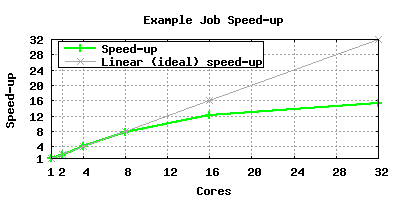
Hence for this application, jobs should be run with up to 8, or possibly 16, cores but requesting 32 cores would not provide a lot of benefit.